Scheduling now uses your store time zone
Sep 23, 2026
·
1 min read
Schedule badges and banners in your Shopify store time zone, wherever you or your team are working. No need to convert times: a sale scheduled to start at midnight starts at midnight in your store's time zone.
Flair now uses the same time zone as Shopify's built-in discounts, making it easy to give your badges, banners, and discounts matching start and end times.
A redesigned scheduler
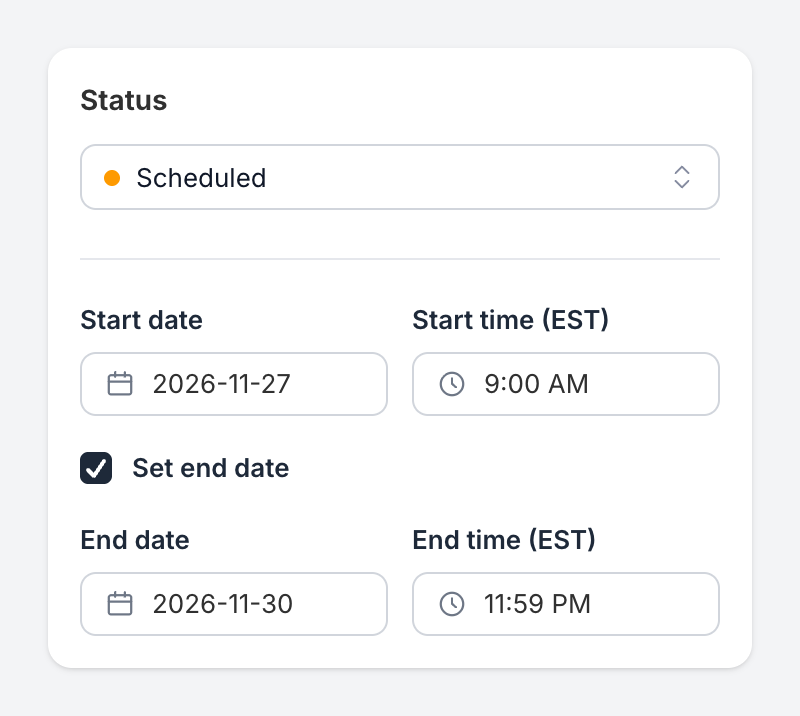
- Separate date and time fields. Pick a date from the calendar and a time from the list, or type either one. You can schedule to the minute, such as 9:05 AM.
- Visible time zone labels. Each time field shows your store's time zone, for example Start time (EST).
- Optional end date. Check Set end date to turn a promotion off automatically. It defaults to 11:59 PM on your start date. Adjust the date and time to match when your sale ends.
No changes needed to existing schedules
Existing promotions will still start and end at their originally scheduled dates and times. Flair now displays their schedules in your store's time zone instead of your browser's, so the displayed dates and times may change if those time zones differ.
Learn more about scheduling promotions.